Onboard & track assets
- Register the QR to the device IMEI at install
- Confirm the model and log a successful installation
- Add install notes, attached to the device record
- Track each asset's last-known status in LinQView

NuvoLinQ-connected devices can be paired with a QR sticker tied to their full record in the cloud. Using the ScanLinQ app, teams can scan the QR code to onboard a device, confirm an install, or open a fully attributed support ticket. Because the record lives in the cloud, you get the device's story even when the device itself is offline.
ScanLinQ is not just a way to report a fault. The same QR follows a device from the day it is installed to the day it needs help.
A field tech scans to register the device to its IMEI and confirm a clean install.
Every asset and its last-known status live in LinQView, ready to look up anytime.
Authorized users can scan the QR code to open a complete, routed ticket the moment something breaks.
01 The problem
When a device in the field stops working, support can spend the first 20 minutes asking questions the technician should not have to answer. ScanLinQ closes that gap with a single scan.
02 Two jobs, one scan
ScanLinQ does two things for a NuvoLinQ fleet. Field teams use it to register and commission new assets. Anyone on site can use it to report a fault. Both run off the same QR.
03 How it works
Every NuvoLinQ-connected device ships with a small, individually serialized QR sticker. That sticker is the only hardware ScanLinQ needs. The rest is the ScanLinQ app and a help desk workflow that is ready.
The ScanLinQ app scans the serialized NuvoLinQ QR tag and opens the device record. Field teams can use the same scan to onboard, update, or report an issue tied to the correct device, SIM, and site.
ScanLinQ pulls the device record from LinQView and attaches everything support needs: IMEI, IMSI, ICCID, IP address, APN, carrier, model, serial, MAC, and the merchant record.
A ticket is created and routed to the help desk, tagged to the right device, SIM, and site. No discovery call, no reading numbers off the back of a device. The rep just starts solving.
04 What a scan captures
One scan pulls the device's full record from LinQView. No typing, no guessing, and no asking the person on site to find a serial number on the back of a unit.
05 When the device is down
The hardest tickets are the ones where the device has dropped off the network, which is exactly when you cannot query it for details. ScanLinQ reads from the cloud record, not the device, so a scan still returns the last-known status, the assigned IP, the carrier, and the full asset history. It gives support a fallback record when connectivity fails.
06 Where it earns its keep
ScanLinQ is most useful when the person who finds the problem is not the person who fixed it, and when neither of them is sitting next to a laptop.
A field tech mounts a new router and scans the sticker to register it to its IMEI, confirm the model, and log a clean install. The asset is live in LinQView before they leave the site.
A cashier sees the terminal drop at the start of the lunch rush. They scan the QR on the back, and the ticket lands at HQ with the carrier, SIM, and store already attached.
A utility tech twelve miles from the office finds a handheld that will not connect. One scan files a ticket, last-known carrier and signal included, before they call dispatch.
An authorized staff member, security guard, or service technician can scan the kiosk and flag the fault. The ticket records which kiosk, which carrier, and when it last checked in.
07 Built for field teams
Each QR carries a signed device identifier to help prevent spoofing and unauthorized cloning.
The technician app admits only approved work-email domains, so only your team registers and manages assets.
The ScanLinQ app is free on the App Store and Google Play. The ScanLinQ app is used to scan QR codes, register assets, and submit support records.
Every install, scan, and ticket is logged and attributable, ready for review whenever you need it.
08 Built into your stack
ScanLinQ does not live on its own. Asset data flows into LinQView, the dashboard your team uses to monitor the fleet, and tickets flow into your help desk. Each one is routed, tagged, and tied to the right device record.
09 Scanned, solved
Field techs and support teams use ScanLinQ to cut resolution time. Here is the proof.
★ FEATURED ANNOUNCEMENT · SCANLINQ
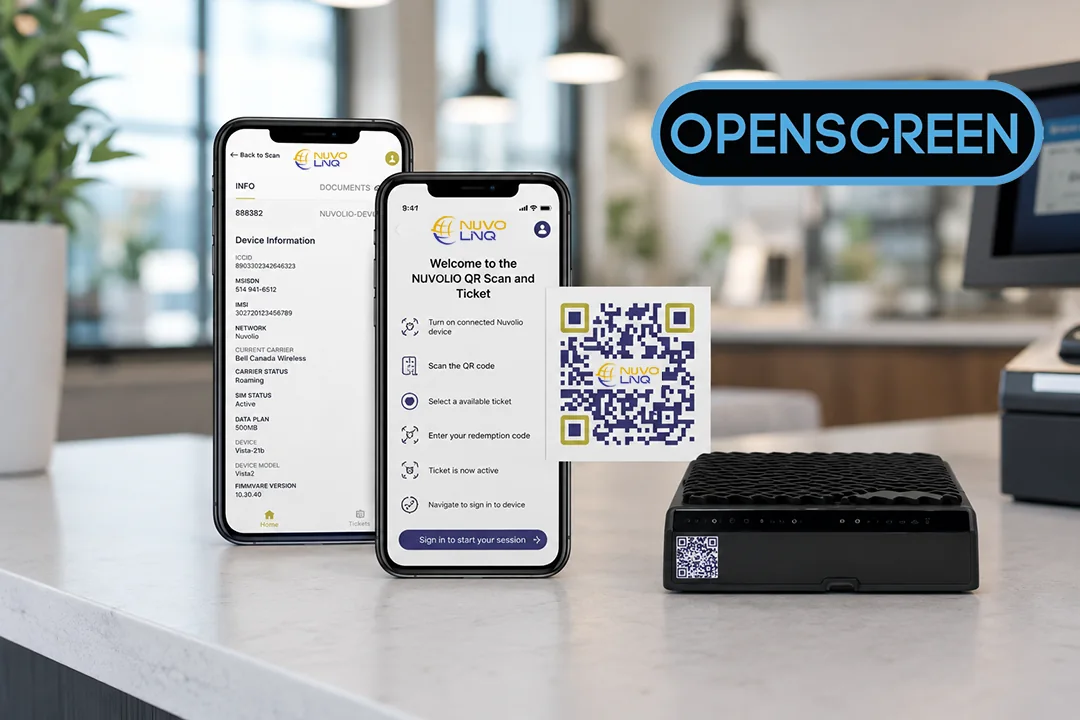
A single scannable QR sticker turns any phone into an instant, fully attributed support ticket. No app required, from anywhere in the field.
→ Support from a sticker
See how ScanLinQ turns a QR scan into an attributed ticket, or browse the newsroom.












10Frequently asked questions
Straight answers, no sales call required. Every claim here is the same one we make in the contract.
ScanLinQ is NuvoLinQ's QR device-binding app. Every NuvoLinQ-connected device ships with an individually serialized, signed QR sticker tied to its full record in LinQView. Scanning it with the ScanLinQ app onboards a device, confirms an install, or opens a fully attributed support ticket that routes to the help desk with the IMEI, ICCID, carrier, and status already attached.
A ScanLinQ scan pulls the device's full record from LinQView: IMEI, serial number, device model, MAC address, ICCID, IMSI, IP address, APN, carrier, merchant name, merchant address, last-known status, and last-seen location. When the device is provisioned through NuvoLinQ, the ticket can also include its static IP, APN, and private connectivity details. No typing is required.
Yes. ScanLinQ reads from the cloud record in LinQView, not from the device, so a scan still returns the last-known status, assigned IP, carrier, and full asset history when the device has dropped off the network. This gives support a fallback record when connectivity fails, with no live device connection required.
A ScanLinQ scan opens a pre-filled, attributed ticket the moment the QR is read, while a phone call starts with the technician describing the issue and support hunting for the IMEI, ICCID, and carrier. Without ScanLinQ, support can spend the first 20 minutes asking questions; with it, the ticket routes to the help desk with device, SIM, and site already tagged.
ScanLinQ routes pre-filled tickets into Freshdesk, tagged to the device, SIM, and merchant, while asset data flows into LinQView. Tickets are ready for immediate triage with no discovery call. Every install, scan, and ticket is logged, attributable to the person and the scan, and exportable when compliance asks.
The ScanLinQ app runs on iOS 16 and later and Android 12 and later, and is free on the App Store and Google Play. The technician app admits only approved work-email domains, so only your team can register and manage assets. Each QR carries a signed device identifier to help prevent spoofing and unauthorized cloning.
11 get started
Get a connectivity assessment and a look at ScanLinQ built around your fleet. We map what you run, find the right deployment, and hand you a concrete plan. No generic demos, no runaround.
ScanLinQ turns one QR scan into a fully attributed support ticket from any phone, on a private wireless backbone with a 99.99% uptime SLA.